
MainWP Code Snippets Extension
Run, save and remove PHP code snippets on your child sites without editing functions.php on each one.


Run and save PHP code snippets on all your child sites from your MainWP Dashboard
The MainWP Code Snippets Extension is a Pro MainWP add-on that lets you run, save and remove PHP code snippets on your child sites from one place. You can run a snippet and read what each site returns, save it in a site’s database so it runs every time the site loads, or write it to wp-config.php, without editing functions.php or wp-config.php by hand on each site.
What the MainWP Code Snippets Extension replaces
Without the extension, a small code change means opening each site’s theme functions.php or wp-config.php and adding the code there. With the MainWP Code Snippets Extension, you write the snippet once on your Dashboard, choose the sites, tags or clients it applies to, and run it. Saved snippets stay in a list, so you can run them again later.
MainWP Code Snippets Extension features
| Feature | What it means for you |
|---|---|
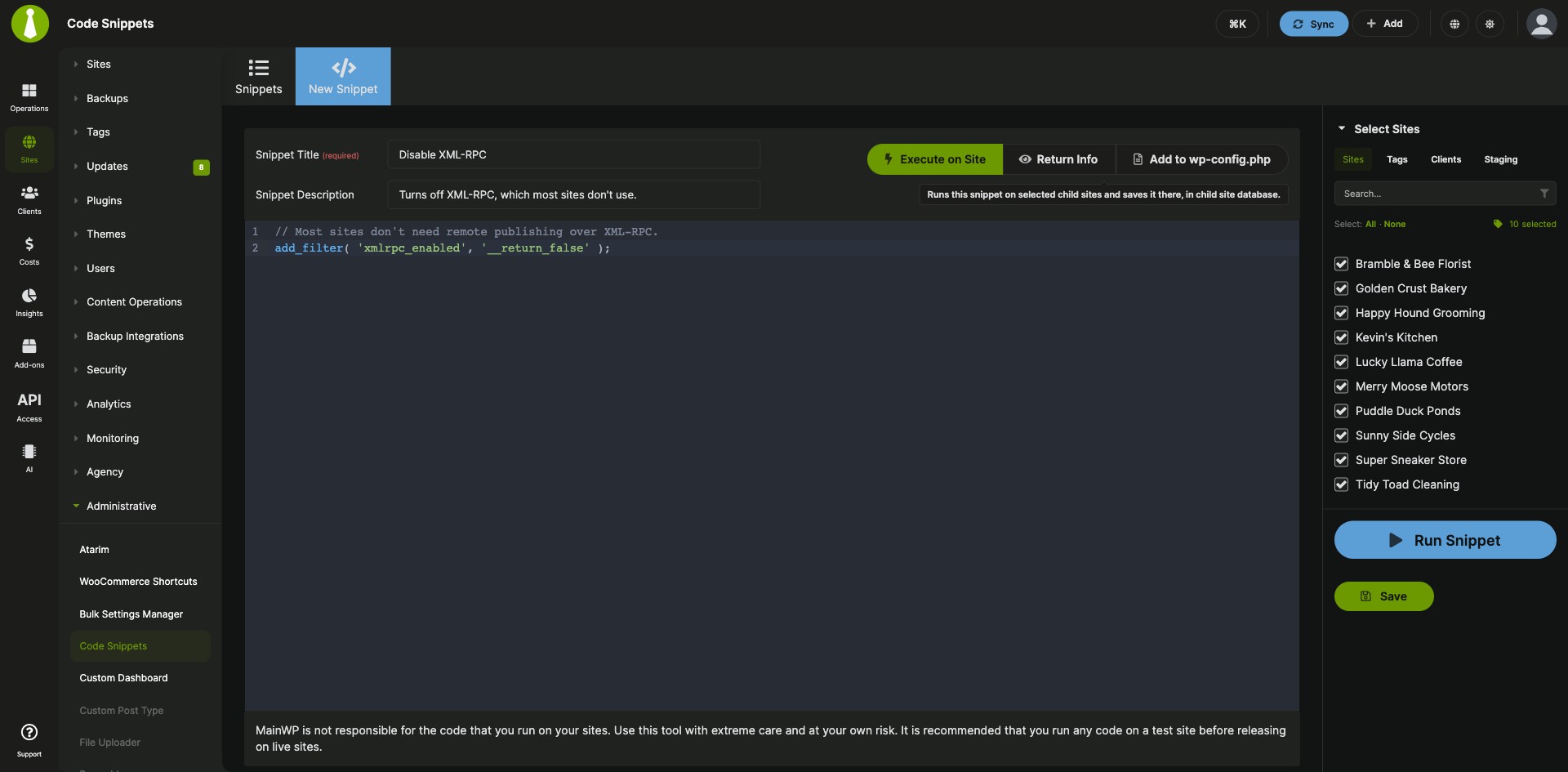
| Three snippet types | Execute on Site saves the snippet in the child site’s database and runs it when the site loads. Return Info runs the snippet on the selected sites and shows what it returns in the Console, without saving it on the sites. Add to wp-config.php writes the snippet to each selected site’s wp-config.php file. |
| Sites, tags or clients | Choose where a snippet applies from the Sites, Tags or Clients tab of the Select Sites panel. Each saved snippet keeps one targeting mode. |
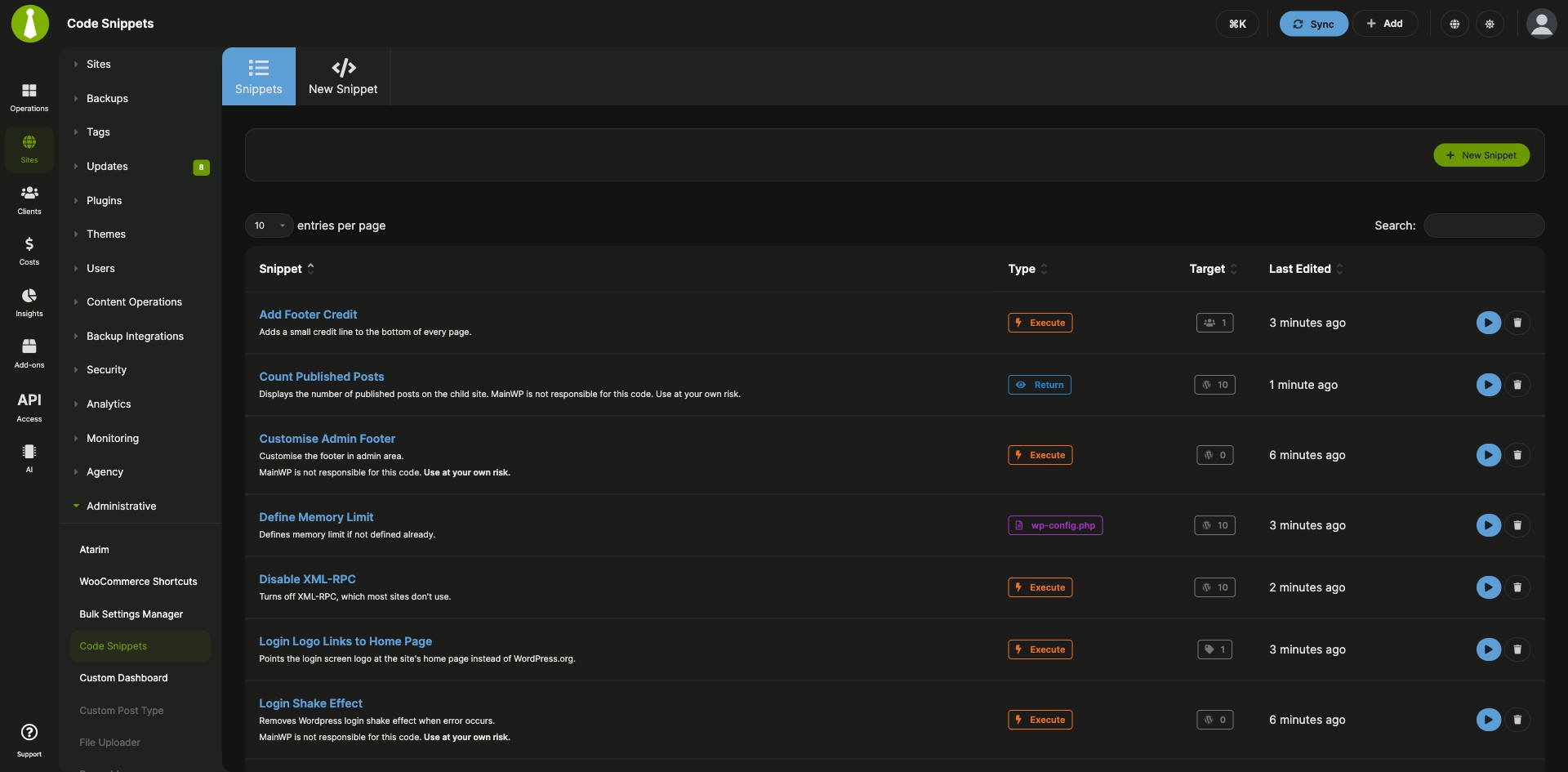
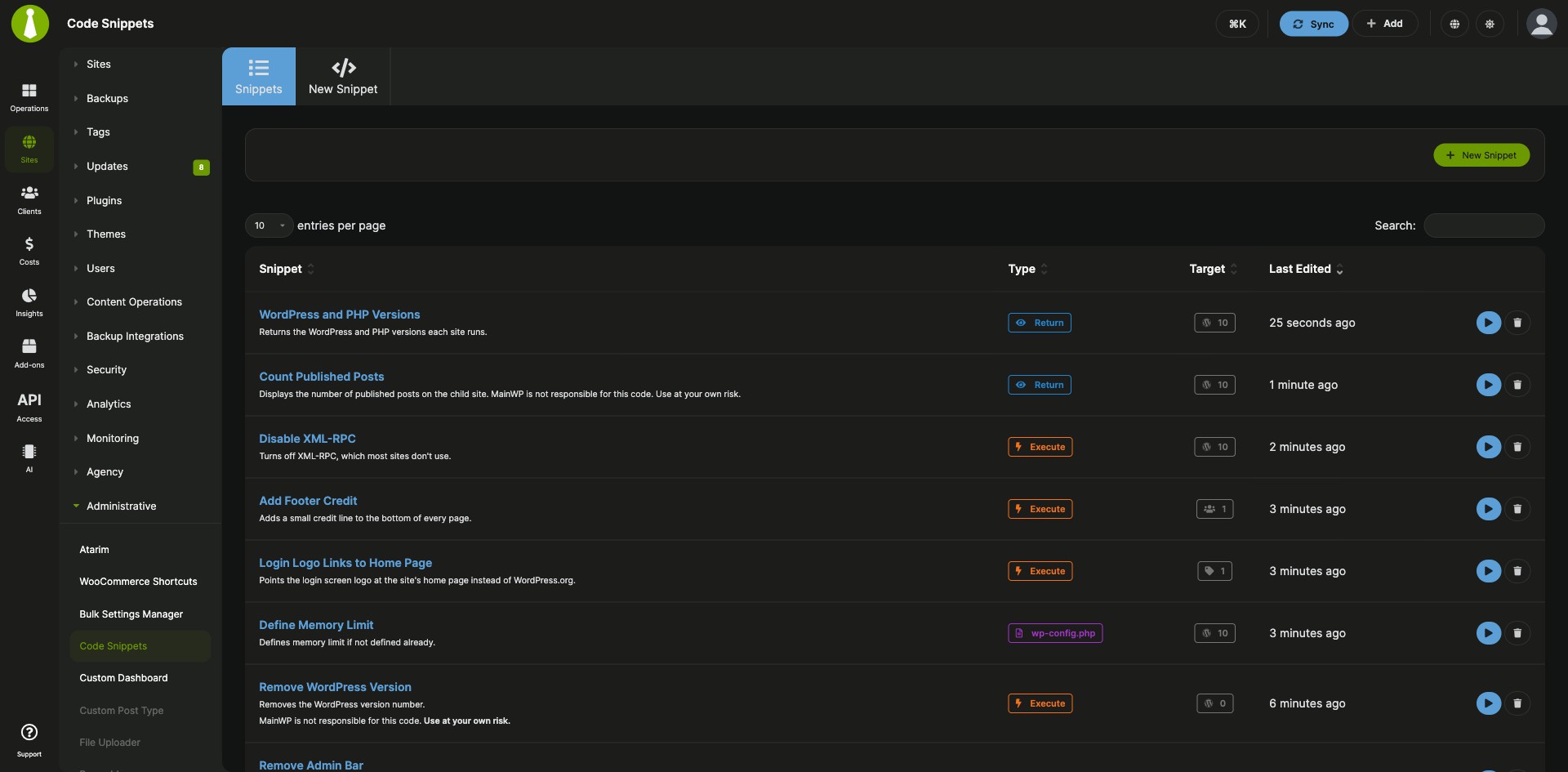
| Saved snippets | Save a snippet on your Dashboard without pushing it to child sites, then run it later. The Snippets tab lists each snippet with its type, target count and when it was last edited. |
| Code editor | Write snippets in a CodeMirror 6 editor with code folding, autocompletion, automatic bracket closing, bracket matching, Tab indentation and line wrapping. |
| PHP syntax check | Before a snippet is saved, run or pushed to child sites, the extension checks its PHP syntax. If it finds an error, it stops and shows the error message. |
| Console | Follow each run in the Console, with progress counts, a status icon for each site, the output of Return Info snippets, and a Stop Process button. |
| Remove snippets from sites | Unselect sites, tags or clients and run the snippet again to take it off those sites. Clear every target to remove it from all child sites and keep it saved on your Dashboard. |
MainWP Code Snippets Extension requirements
| Item | Requirement |
|---|---|
| License | MainWP Pro (included in the Pro Bundle) |
| MainWP Dashboard | The MainWP Code Snippets Extension installed and activated on your Dashboard site |
| Third-party plugins | None |
| Experience | Recommended for experienced PHP coders |
How to set up the MainWP Code Snippets Extension
Run a new snippet
- Go to MainWP > Add-ons > Administrative > Code Snippets and open the New Snippet tab.
- Enter a Snippet Title and, if you want, a Snippet Description.
- Choose the snippet type: Execute on Site, Return Info or Add to wp-config.php.
- In Select Sites, choose the Sites, Tags or Clients where the snippet should run.
- Add your code in the code editor and click Run Snippet. The extension saves the snippet, checks the PHP syntax and opens the Console.
Save a snippet and run it later
- Fill in the New Snippet tab the same way and click Save. The snippet is saved on your Dashboard and is not sent to child sites.
- When you want to run it, open the Snippets tab and click the snippet title or the green action button.
- Check the snippet type and the selected Sites, Tags or Clients, then click Run Snippet.
Remove a snippet from child sites
- Open the snippet from the Snippets tab.
- Unselect the sites, tags or clients you want to remove it from. To remove it from every site, clear all targets.
- Click Run Snippet. The extension removes the saved copy from child sites and adds it back only to the targets that are still selected.
Full instructions, example snippets and the recovery steps: MainWP Code Snippets Extension documentation.
How the MainWP Code Snippets Extension works
The MainWP Code Snippets Extension runs on your MainWP Dashboard, keeps your saved snippets there, and sends a snippet to the child sites you selected when you click Run Snippet. Execute on Site snippets are stored in each child site’s database and run when the site loads, Add to wp-config.php snippets are written to the site’s wp-config.php file, and Return Info snippets send their output back to the Console.
MainWP Code Snippets Extension FAQ
Can I add code to my child sites without editing functions.php?
You can add code without editing functions.php by using the Execute on Site snippet type, which saves the snippet in each selected child site’s database and runs it when the site loads. The docs give customizing the admin footer across your sites as an example.
Can I change wp-config.php settings on my child sites?
You can change wp-config.php settings with the Add to wp-config.php snippet type, which writes the snippet to the wp-config.php file of each selected child site. The docs include ready-made snippets for constants such as WP_MEMORY_LIMIT, DISABLE_WP_CRON, WP_HTTP_BLOCK_EXTERNAL and DISALLOW_FILE_EDIT.
Do I need to know PHP to use the MainWP Code Snippets Extension?
Yes, MainWP recommends the extension for experienced PHP coders only. MainWP is not responsible for the code you run on your sites, so run any snippet on a test site before you use it on live sites.
How do I fix a child site after a bad snippet?
Remove the snippet from the site’s database. Open the database in phpMyAdmin, open the options table (wp_options by default, though your prefix may differ), and delete the mainwp_ext_snippets_enabled or mainwp_ext_code_snippets row. That removes every database-saved snippet the extension added. A bad snippet saved to wp-config.php has to be removed by editing that file by hand.
Do I need to install anything on my child sites?
You don’t need another plugin on your child sites. The MainWP Code Snippets Extension runs on your MainWP Dashboard and sends snippets to the child sites connected to it.
What do I need to pay for?
The MainWP Code Snippets Extension is part of MainWP Pro and is included in the Pro Bundle. It needs no third-party plugins or outside services.
Where do I get support?
MainWP support handles all questions about the MainWP Code Snippets Extension, since MainWP develops it and it doesn’t depend on a third-party service.